
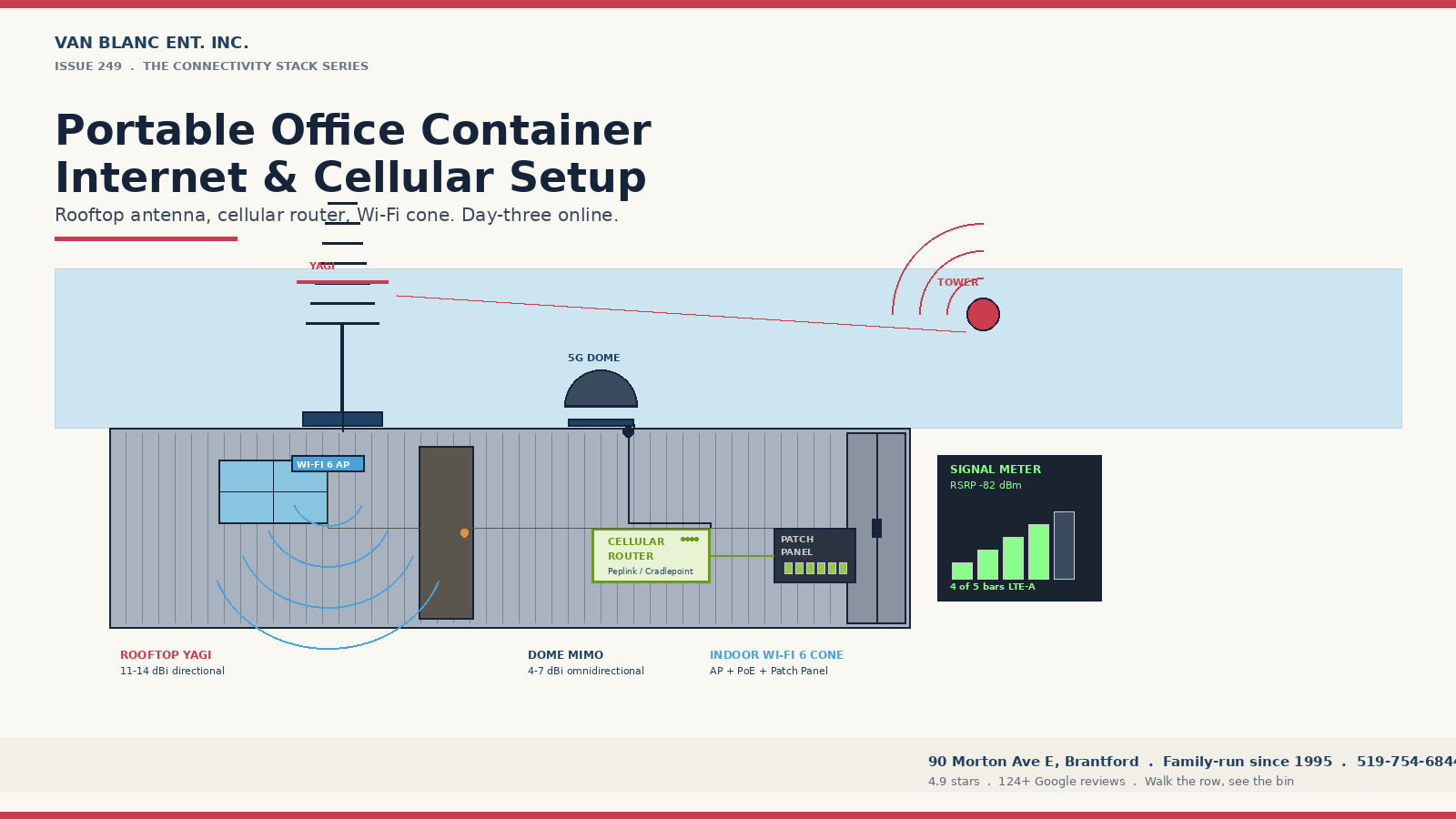
Quick Answer: On Ontario jobsites, including the residential builds covered by Tarion New Home Warranty programs, a portable office container internet cellular setup pairs a rooftop yagi or dome antenna with a Cat-12 or 5G cellular router and an indoor Wi-Fi access point. Expect 50-300 Mbps on Rogers, Bell, or Telus business plans. Starlink Roam is the rural fallback. Your hardware investment scales with how many SIMs, antennas, and access points the site needs. Pricing depends on your site, your grade choice, and your freight zone, so call for a real quote. Brantford-based since 1995, family-operated, 4.9-star verified (140+ Google reviews). 1-3 day delivery Ontario-wide.
In This Guide
- Why internet is the first question on a container office
- What is the cellular-first setup for an Ontario jobsite?
- When does Starlink Roam beat cellular?
- Yagi or dome: which rooftop antenna do you need?
- Which router is right: Cradlepoint, Peplink, or carrier?
- How do you power and ground the gear inside the box?
- What drives the data plan cost in Ontario?
- How do you cover a steel box with Wi-Fi?
- How do you keep a safety-critical site online?
- What does Van Blanc install on every office build?
- FAQs
Reading time: about 14 minutes.
Why is internet the first question on every container office order?
A portable office container internet setup is the network stack that makes a steel jobsite office usable on day one: a cellular router with a roof-mounted antenna, an indoor Wi-Fi access point, and a business data plan, with Starlink Roam as the rural fallback. A correctly aimed external antenna is the part that decides whether it works.
When a buyer calls about a container office, they want to know three things in this order. How fast can it land. What does it cost. And how do we get internet inside it. The third question used to come last. It comes first now. A modern site office runs Procore, drone uploads, video conferencing with the architect, time-clock punches, and safety-board video feeds. None of that works on a phone hotspot when three trades share the bandwidth.
Paul has been listening to that question shift for five years. The site superintendent who used to need a desk and a kettle now needs a 100 Mbps pipe with 30-second failover and a Wi-Fi cone that reaches the lunch trailer. A jobsite office only earns its keep when it is online, which is why we cover the broader container versus trailer and rent versus buy decision alongside the network build.
Ontario has three layers of network reality. Urban sites in the GTA, Hamilton, London, and Ottawa get strong 5G from all three carriers. Suburban and rural-fringe sites get reliable LTE. Far-rural and northern sites, including cottage country and mining claims, often drop to weak LTE or no service. The right setup changes with the layer.
What is the cellular-first setup for an Ontario jobsite office?
For roughly 80% of Ontario sites, the right answer is cellular. No trenching. No ISP install date that slips three weeks. No fibre drop fees that match the rent on the container. You drop a router in the office, point the antenna at the right tower, and the crew is on the network before the trailer is levelled. Pick the right box first: our in-stock office-ready containers all leave room on the roof for an antenna mount.
A proper cellular setup has four parts. A SIM-equipped router (Cat-12 LTE-Advanced or 5G sub-6). An external high-gain antenna on the container roof, cabled through a sealed port. A Wi-Fi access point or two inside. A business data plan that does not throttle at 50 GB.
Why an external antenna matters more than the router
The biggest mistake on container office connectivity is running the router with stock paddle antennas inside a steel box. The container is a Faraday cage. Signal that hits the outer skin loses 15 to 25 dB before reaching the modem. A roof-mounted external antenna with a low-loss cable run under 6 metres recovers that margin and often turns a one-bar signal into four bars. The router is the brain, the antenna is the body. Skipping the antenna is why most sites complain that “the internet does not work.”
Christian LeBlanc, second-generation operator: “Nine times out of ten the buyer asks me for the fastest router on the market, and nine times out of ten the router is not the problem. I tell them the same thing in the yard every week: spend the money on the antenna and the cable, point it at the right tower, and a mid-range router will run circles around an expensive one sitting blind inside the steel. I grew up watching my dad sort the real fix from the expensive fix. This is one of those.”
A site office with three to six users browsing, emailing, and running cloud-based PM software needs 25 to 50 Mbps sustained. Add video conferencing and drone uploads and the target climbs to 100 Mbps. Most Ontario LTE-A and 5G cells deliver that with a properly aimed external antenna.
When should you use Starlink Roam instead of cellular?
When a site is too far from a cell tower for cellular to work, Starlink Roam becomes the answer. Roam is SpaceX’s portable subscription tier (formerly Starlink for RV) that lets the dish move between locations and pause when the project finishes.
Real-world Roam speeds in Ontario sit between 50 and 220 Mbps download with 20 to 40 ms latency. That is faster than rural DSL, faster than most cottage-country fixed wireless, and on par with mid-tier urban cable. The dish takes about 15 minutes to deploy on a tripod or roof mount. It needs a clear view of the northern sky.
Starlink hardware and cost reality 2026
The Standard kit is a one-time hardware purchase, and Roam Unlimited is a flat monthly subscription that runs higher on the global plan than on the regional plan. The pause feature means a five-month season only costs the dish plus the five months you actually use, since you suspend service in the off-season. For a seasonal cabin build in the Kawarthas, that math beats running fibre 800 metres down a private road.
Starlink also pairs well with a cellular router as the failover side of a hybrid setup. Sites with safety-camera feeds or live monitoring should always have both.
Yagi or dome: which rooftop antenna does a container office need?
Two antenna shapes show up on container office roofs. Yagi (log-periodic) antennas are directional, look like a long arrow with crosspieces, and offer 11 to 14 dBi gain when aimed at a known tower. Dome antennas (puck or shark-fin) are multi-band MIMO, much shorter, omnidirectional, with 4 to 7 dBi gain.
Yagi wins for fixed long-stay sites with a known tower direction and weak surface signal. The directional gain can pull a one-bar location to three or four bars after a one-hour aim with a signal meter. Dome wins for sites that move, sites where the foreman cannot promise the tower direction, or sites with mixed-carrier SIMs.
How to pick between yagi and dome for your container office
- Fixed two-year build, weak rural signal: Yagi, aimed, with a cable run under 6 metres. Best signal recovery.
- Rotating short-term sites with decent suburban signal: Dome MIMO. Faster to deploy, no aiming required.
- Site with line of sight to a known tower under 8 km away: Yagi. Directional gain is decisive at that range.
- Site near multiple towers with carrier flexibility: Dome MIMO. Aim is irrelevant when towers surround you.
- Mining and forestry sites, single tower direction: Yagi, possibly two stacked for diversity.
Mounting matters as much as antenna shape. A roof-edge mount with a stainless plate and butyl rubber sealant lasts. A magnetic puck thrown on the roof corrodes in one winter. Cable entry uses a sealed gland so water cannot wick down the LMR-400 cable. Skipping the seal causes rust streaks inside the office within six months.
Cradlepoint, Peplink, or a carrier gateway: which router is right?
Three router families dominate the Ontario container office market. Cradlepoint (now owned by Ericsson) sells the E300 and E3000 indoor routers and the rugged W2005 outdoor endpoint. Peplink sells the MAX BR1 Pro 5G and the Balance series. The Canadian carriers sell their own “business internet anywhere” gateways, usually rebadged versions.
Cradlepoint runs NetCloud, an enterprise cloud management platform. It lets IT push config, monitor signal, and lock down the network from a browser. The tradeoff is per router per year in licensing. Peplink runs InControl 2, similar concept, contractor-friendlier UI, free management on many models. For a single container office on a single site, Peplink usually delivers the same performance at lower three-year cost.
Paul LeBlanc, owner: “When a buyer calls asking for the connectivity setup, I ask one question first: who will rebuild the network when something breaks at 7 a.m.? If the answer is the foreman, we put a Peplink in there because the foreman can fix it from his phone. If the answer is a corporate IT team, Cradlepoint earns its license fee because they manage 40 sites from one screen. Both work. The wrong one is the one nobody on site can troubleshoot.”
The carrier-supplied gateway is the simplest option for a single site. Rogers Business, Bell, and Telus each offer a turnkey LTE or 5G device with a SIM, Wi-Fi radio, and flat monthly fee. They are sealed black boxes (no SIM porting, no antenna-port tuning, no central management). For one office on one site for one year, fine. For anyone running multiple sites, the third-party router pays back the difference inside the first job.
How do you power and ground the network gear inside a container?
The network gear shares the electrical system with the lights, the heater, and the coffee maker, so it pays to read up on getting temporary power to a jobsite office before the router ever powers on. A few details keep the network from being the first thing to die when something surges or the generator hiccups.
Put the router on a UPS. A 600 to 1000 VA unit runs the router and Wi-Fi AP for 20 to 60 minutes through a brownout. Enough to ride out generator switchovers and the typical 30-second utility blip. Without a UPS the router reboots, Wi-Fi takes 90 seconds to come back, and the foreman’s video call drops worse than the outage itself.
The antenna cable on the roof is a lightning path. An inline surge protector near the cable entry, grounded to the container shell, dumps a strike to the steel before it reaches the router. For high-exposure sites a copper ground rod beats relying on the chassis alone.
Why this matters in Ontario specifically
Southern Ontario sits inside one of the most lightning-active corridors in Canada. Environment Canada flash counts in Brant, Norfolk, and Niagara routinely beat the national average. A container office on a hilltop with a 6-foot antenna and an ungrounded cable run is a textbook strike target. Across 19 years in containers Paul has replaced enough fried routers to know the surge protector pays for itself the first season.
What does a container office data plan actually cost in Ontario?
The router is a one-time cost. The data plan is the recurring cost that matters. Canadian business cellular pricing has come down since 2024 but still sits above residential pricing on the same network. Typical 2026 Ontario ranges:
| Carrier | Business plan tier | Monthly data | What drives the monthly cost |
|---|---|---|---|
| Rogers Business | Unlimited Data Plan, LTE/5G | Unlimited (200 GB at full speed, throttled after) | Lower if the SIM rides an existing fleet account, higher as a standalone line |
| Bell Business Mobility | 5G+ Business Internet Anywhere | 250 GB to unlimited | Scales with the full-speed data cap and whether you add a static IP |
| Telus Business | 5G Business Mobility, large data | 200 GB to unlimited | Set by the data tier and any multi-line discount on the account |
| Starlink Roam Regional | Unlimited, throttled after 1 TB | 1 TB | Flat subscription you can pause off-season to cut the annual spend |
A realistic monthly bill for a fully connected container office swings with user count and whether you carry Starlink as failover, but it usually lands well under what most contractors guess before they shop. The myth that jobsite internet is wildly expensive dies the moment someone actually compares business cellular plans against their assumptions.
Watch out for shared business plans
If the company already has a Rogers, Bell, or Telus business mobility account for the truck fleet, the container office SIM can usually ride on the shared data pool rather than a separate account. That trims the recurring cost of every office line you add. Ask for a “shared data add-on” or “internet anywhere SIM” rather than a standalone plan.
How do you get Wi-Fi to cover a 20ft or 40ft steel box?
A 20ft office is 6 by 2.4 metres internally. A 40ft is 12 by 2.4 metres. A 40ft high cube adds a foot of headroom, and the way you lay out those sizes and interior plans for an office build decides where the access point lands. None of those distances challenge Wi-Fi. The steel skin reflecting signal around inside and creating dead corners is the actual challenge.
For a 20ft office, a single Wi-Fi 6 access point at adult head height (about 1.8 metres) covers the space cleanly. For a 40ft office, two APs at each end on the same SSID with roaming enabled. Skip consumer-grade combined router-modem-AP units. They work but were not designed for the radio environment of an all-steel enclosure.
Enterprise-grade options that work well in a container office include Ubiquiti UniFi U6-LR or U7-Pro, TP-Link Omada EAP670, Aruba Instant On AP25, and the Wi-Fi AP add-on modules from Peplink and Cradlepoint. Budget for one access point in a 20ft office and two in a 40ft. Power them with PoE so each only needs one Ethernet run.
The metal-roof Wi-Fi quirk most installers miss
Container roof corrugation is just thin enough that 2.4 GHz signal leaks through but 5 GHz does not. If the crew expects the foreman’s Wi-Fi to reach the lunch trailer parked beside the office, the 5 GHz radio will not get there but the 2.4 GHz radio sometimes will. The fix is a second access point in the lunch trailer wired back to the main office, not a heroic attempt to penetrate steel with a single radio.
How do you keep a safety-critical jobsite from losing connection?
Some sites cannot tolerate an outage. Safety-camera feeds, lone-worker monitoring, automated gate systems, and crane telemetry all assume the network is up. A single cellular setup is not enough. The answer is dual SIM with two carriers, or cellular plus Starlink.
Dual SIM works because the carriers do not share outages. A Peplink MAX BR1 Pro 5G with one Rogers SIM and one Telus SIM hot-fails inside 30 seconds when the first one degrades. The site never notices.
Cellular plus Starlink works because the failure modes are uncorrelated. A cell tower outage does not touch the satellites; a solar storm does not touch the cell tower. For a remote mining bunkhouse or a critical-infrastructure build, running both is the setup the corporate insurance underwriter wants to see.
What connectivity does Van Blanc install on a container office?
When a buyer orders a container office from Van Blanc and asks us to spec the network, this is the default, and it rides along with the rest of the conversion work we finish at the Brantford yard before the unit ships. Christian walks the buyer through it in the yard before delivery, no surprises on install day.
Hardware. One Peplink MAX BR1 Pro 5G or Cradlepoint E300 (depending on corporate IT preference). One Wi-Fi 6 access point per 20ft of office length. One LTE/5G dome antenna or 11 dBi yagi roof-mounted. One sealed cable entry gland. One 1000 VA UPS. One inline coaxial surge protector. One copper ground rod where the site warrants it.
Plan. One business SIM on the dominant local carrier (Rogers in most of southern Ontario, Bell or Telus in northern and Eastern Ontario). One Starlink Roam dish if the surface signal tests below RSRP -100 dBm on the site visit.
Install timing. Most container offices land, level, and get power on day one. Network is live on day two once the antenna is mounted and the SIM is activated. The crew is online by lunch on day three on almost every job we have shipped since 2022. Our whole approach to a portable office is built around that day-three deadline, because the site super is the one who has to justify the cost to head office.
Service. Christian or one of our drivers re-aims the antenna at no charge if the first speed test is disappointing. After 19 years in containers, Paul has watched enough crews struggle with “it does not work” to know the in-person follow-up separates a good install from a bad one.
Frequently asked questions
How much does a complete portable office container internet cellular setup cost in Ontario?
Hardware cost scales with the build. A basic single-SIM Peplink with a dome antenna and one Wi-Fi access point sits at the low end, while a dual-SIM Cradlepoint with stacked yagi antennas, two Wi-Fi 6 access points, a UPS, and a surge protector sits at the top. The recurring cost is the data plan: a single business cellular line is the cheapest, Starlink Roam Regional is a flat subscription, and running both as failover roughly stacks the two together. Tell us the user count and the site and we will price it out honestly.
Do I need an external antenna or will the router work inside the container?
You need an external antenna in almost every case. A shipping container is essentially a Faraday cage and signal loses 15 to 25 dB through the steel skin. The same router that pulls 80 Mbps with a roof-mounted antenna will pull 5 to 15 Mbps with the stock paddles inside. The antenna upgrade plus a half-day of install is the single best dollar-for-dollar improvement you can make.
Can Starlink replace cellular for a permanent jobsite office?
Yes for speed and latency, with two caveats. The dish needs an unobstructed view of the northern sky which is sometimes blocked by tree canopy on heavily wooded sites. And satellite service can drop briefly during heavy storms or the rare solar event. For a permanent two-year build the resilient answer is Starlink as primary and a cellular SIM as failover, which adds a modest monthly line charge for the redundancy.
Will Rogers, Bell, or Telus give better coverage at my Ontario site?
It depends on the closest tower. Rogers has the densest urban network in southern Ontario but Bell and Telus partner extensively in rural and northern Ontario, so the Bell-Telus shared towers often win outside the GTA. The honest answer is to test with a SIM from each carrier during the site visit, or to call us and we can usually tell you from the address which carrier dominates that pocket of the province.
How much data does a typical six-person container office use per month?
Modern site offices running Procore, Microsoft 365, video conferencing, and a security camera feed average 80 to 200 GB per month for a six-person crew. Add drone uploads and surveillance footage backups and it climbs to 300 to 500 GB. Most business cellular unlimited plans deliver 200 GB at full speed before throttling, which suits most offices but not the ones with heavy video uploads.
Can I use a residential home internet plan in a container office?
Technically yes if a fixed-line ISP serves the address. Practically no, because residential plans typically forbid business use and the install timeline (two to six weeks) is incompatible with most jobsite schedules. Cellular and Starlink avoid the install delay and the contract terms allow commercial use. A wireline residential plan only makes sense for permanent industrial offices where the project life exceeds five years.
Do I need to ground the antenna on a container office?
Yes for any antenna mounted on the container roof. The steel chassis offers some path to earth but it is unreliable on frozen ground or gravel pads. A copper ground rod tied to the cable surge protector and the antenna mount is cheap insurance against the lightning that southern Ontario produces every summer. Sites at hilltop or treeless locations especially need a proper ground.
Can the same internet setup follow the office to the next jobsite?
That is the entire point of a cellular-or-satellite setup. The router, antenna, Wi-Fi gear, UPS, and SIM all move with the container. Some carriers (Rogers Business and Telus Business especially) handle the address change automatically inside the same plan. Starlink Roam is designed for portability. The fixed-line ISP route is the only one that does not move.
What is the realistic speed I will get on cellular inside a container office?
Urban 5G with a roof-mounted antenna delivers 100 to 400 Mbps download with 15 to 30 ms latency. Suburban and rural LTE-A delivers 30 to 120 Mbps with 25 to 50 ms latency. Edge-of-coverage rural with a directional yagi delivers 8 to 35 Mbps with 40 to 80 ms latency. For most office workflows the LTE-A range is more than enough.
Who installs the antenna and wires the office on a Van Blanc container?
For sites in our regular delivery zones across Ontario, our team can spec the network on the yard visit and have an electrician partner finish the inside wiring on site. The antenna mount itself is usually pre-installed before delivery. For sites farther afield, we work with the buyer’s site electrician or with a local cellular installer to finish the antenna aim and the SIM provisioning. The router and Wi-Fi gear is plug-and-play once the cable runs are in place.
Connectivity rides on top of the box itself: the office shell we build is the part that comes from our yard.
Ready to price your container?
Tell us the size and your postal code and we’ll send back an honest, all-in number, container, delivery, and placement, usually within 1-3 days. No pressure, no mystery fees.
Family-run in Brantford since 1995 · 200+ containers in stock · 4.9★ across 140+ Google reviews · every box graded by a person, walk it before it lands.
Sources
- Rogers Communications. (2025). Temporary internet: How to get WiFi connectivity on your construction job site. Rogers Business Blog. rogers.com
- Ericsson Cradlepoint. (2025). Cradlepoint Enables Construction Site 5G Connectivity. MCA Communications. callmc.com
- SpaceX. (2025). Starlink Roam Subscription. Starlink Service Plans. starlink.com
- Innovation, Science and Economic Development Canada. (2025). Spectrum Outlook and 5G Deployment Reports. ised-isde.canada.ca. ised-isde.canada.ca
- Environment and Climate Change Canada. (2024). Canadian Lightning Detection Network Annual Flash Density Reports. canada.ca. canada.ca
Reach Van Blanc in Brantford
We have been supplying shipping containers across Ontario since 1995. Our warehouse is at 90 Morton Avenue E in Brantford, and we deliver right across the province on a cash-on-delivery basis. No surprise fees, no chase-the-paperwork.
Van Blanc Ent. Inc. 90 Morton Ave E Unit 1B, Brantford, ON N3R 7J7 +1 888-509-6658
If you want a portable office container with the connectivity stack already speced for your site, walk the yard with Christian or Paul, look at the bin you will actually take home, and leave with a plan that has Wi-Fi running by day three of the build.